What did the AI change in the map? Edits item by item instead of a rewritten file
An AI that returns the whole project hides what it rewrote. PlyLoom 0.10 takes edits as a list: review item by item, conflicts, one undo, marks on the map.
In PlyLoom 0.11 the map became a source: a document, a table or a diagram is assembled from it with no AI and no network, and assembled again after any edit. Private sheets, nodes and attributes never go into a prompt, and go into a file for someone else only if you choose so. Before the map leaves, you can see it exactly as it will go.
Take a training map from the examples. A shop has received version 3 of its returns policy, and by Friday the manager wants to know what it means for us. The map has five sheets: Changes, Affected processes, What to do, Questions, and a private sheet For me with my own assessments, not for sending around.
I open Project → Assemble a document…, choose every sheet and press Download .html. Out comes a memo: the changes with clause numbers in both versions, the processes they touch, the actions with owners and due dates, and the open questions at the end. The header names the map version the memo was built from. The For me sheet is not in it: private parts stay out of an assembly until I tick them in.
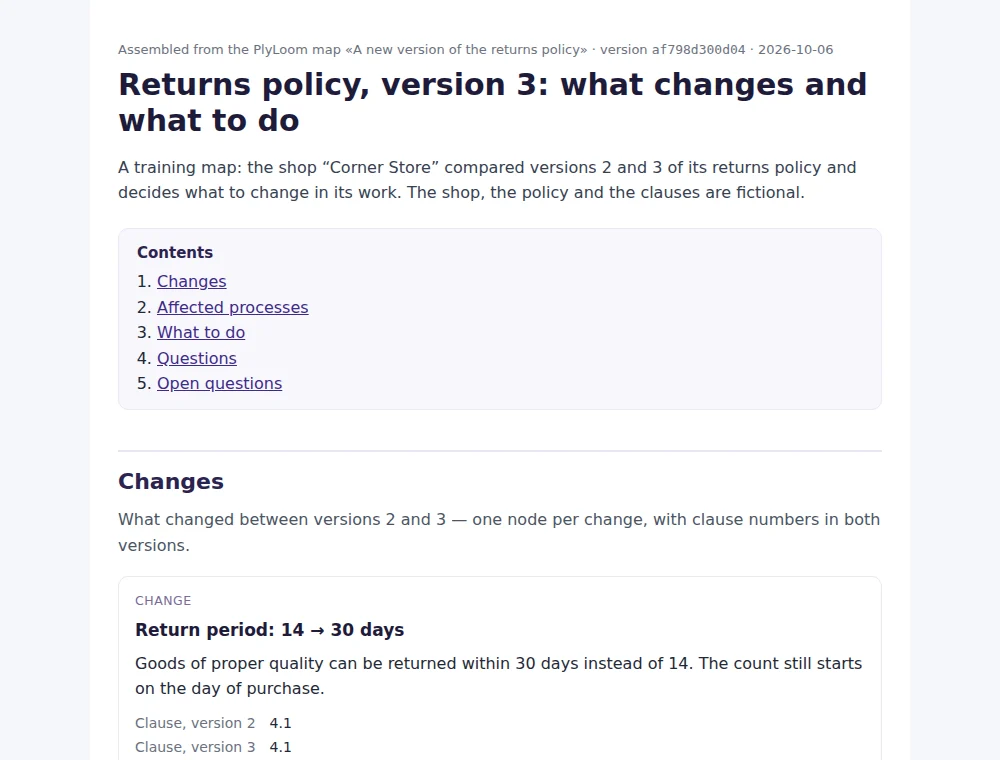
I saved the settings as the assembly Memo for the manager. A week later the briefing moves to 4 December. I change the date on one node and choose Project → Assemble again: Memo for the manager. The new memo has the new date and a new map version in its header. Open this example and try it yourself.
Almost every use case ends not with a map but with a file for another person: a memo, a specification, a CV, a table. Yet all that came out of PlyLoom was .plyloom, .drawio and Canvas. Text for people could be had from an AI chat, but it came out different every time and could not be rebuilt after an edit.
Back in the first article I wrote about a single source: one fragment living in several documents. Assembly is the first working version of that idea.
It is the same idea as a build in code: one source, and the outputs are never edited by hand, only built again. No AI takes part in assembly, on purpose. The same map gives the same file byte for byte: nothing appears in the memo that is not in the map, and nothing that is in the map goes missing.

A document comes in two formats. HTML reads in a browser, prints to PDF and opens in Word. Markdown suits wikis, Git and Obsidian.
The same map assembles into CSV: a row per node with its attributes, or a row per relation. Spreadsheets in European locales get semicolons, decimal commas and a UTF-8 mark. Text that looks like a formula starts with an apostrophe, so a table from someone else’s map runs nothing.
The most useful part is the rows × columns matrix: requirements as rows and checks as columns, say. A cell holds the relations between the two, and the last column counts the columns related to the row. A zero is a requirement without a single check. A sheet can also come out as Mermaid code for GitHub, GitLab, Obsidian and wikis.
A sheet, a node or an attribute can be marked private. A node that stands only on a private sheet becomes private. A node that also stands on an ordinary sheet stays visible: its text is shared by all its sheets. To hide it completely, mark the node itself.
An AI — through the clipboard. The prompt is text you copy yourself. Private parts are cut out of it with their relations, and if a model returns the whole project, the comparison does not offer to delete them: the model never saw them.
People — through files. If the map has private parts, Download .plyloom asks who the file is for: “For me — the whole file” or “For someone else — without private parts”. When a colleague sends the copy back edited, Compare with a file shows their edits item by item and does not offer to delete what the copy never held.
Before a file for someone else, a prompt and an assembly there is a What goes out button. Left, the sheets and nodes: what goes, what stays with you, what goes without the values of private attributes, what is not part of this output. Right, the very text that goes, with a search that also says how many times the same words stand in the whole map.

The check looks for every private name, line of text and value in the output. A match is not always a leak: the same words can stand in an ordinary node. But if you typed your e-mail by hand into an ordinary node, it goes out with that node — and the check shows which private string it came from.
Screenshots are from version 0.11.1 on the training maps “A new version of the returns policy” and “A CV: one achievement, many applications”; the shop, the policy and the person are fictional.
An AI that returns the whole project hides what it rewrote. PlyLoom 0.10 takes edits as a list: review item by item, conflicts, one undo, marks on the map.
Split a diagram into sheets and the links break off at the edges. How PlyLoom 0.9 shows the neighbours: a frame, plates, “More” and a layout that does not jump.
A summary is easy to read and hard to check. A map of changes, linked to clause numbers in both versions, can be checked by eye.
Room is not the problem. Place and neighbourhood are. What astronomers did with the sky, and what it suggests for diagrams.
Tabs, spreadsheets and diagrams all break at the same point. An idea borrowed from technical documentation: reuse one component in many places.